A KeePass Password Safe in VS Code
A KeePass Password Safe in VS Code
AS Notes Pro can now open, edit and create standard KeePass safes right inside your editor - the same .kdbx files you already use in KeePassXC.
You keep your notes in your editor. Increasingly, you keep your code, your terminal and your Git history there too. So when you need a password, a token or a TOTP code while you're working, leaving the editor for a separate app is a small but constant friction.
AS Notes Pro now removes it. There's a new KeePass Password Safe in the sidebar that reads and writes real KeePass KDBX 4 files.
Install from Visual Studio Marketplace / Open VSX
It's genuinely KeePass, not a lookalike
This matters, so I'll say it first: it's the actual KeePass format, via the well-established kdbxweb library. The same file opens in KeePassXC, KeePassDX, Strongbox and the other KeePass apps, and theirs open in AS Notes.
That means you're not locked in. AS Notes is just another editor for your safe, not a new silo with its own export button. If you ever stop using it, your passwords are still sitting in a standard .kdbx that every KeePass client can read. I think that's the right way to build a feature like this - your credentials shouldn't be hostage to one tool.
What you can do
Unlock with a master password, and optionally a key file. KeePass calls the combination a composite key - you can require both a password and a separate key file (kept on a USB stick, say) to open the safe. Both are supported.
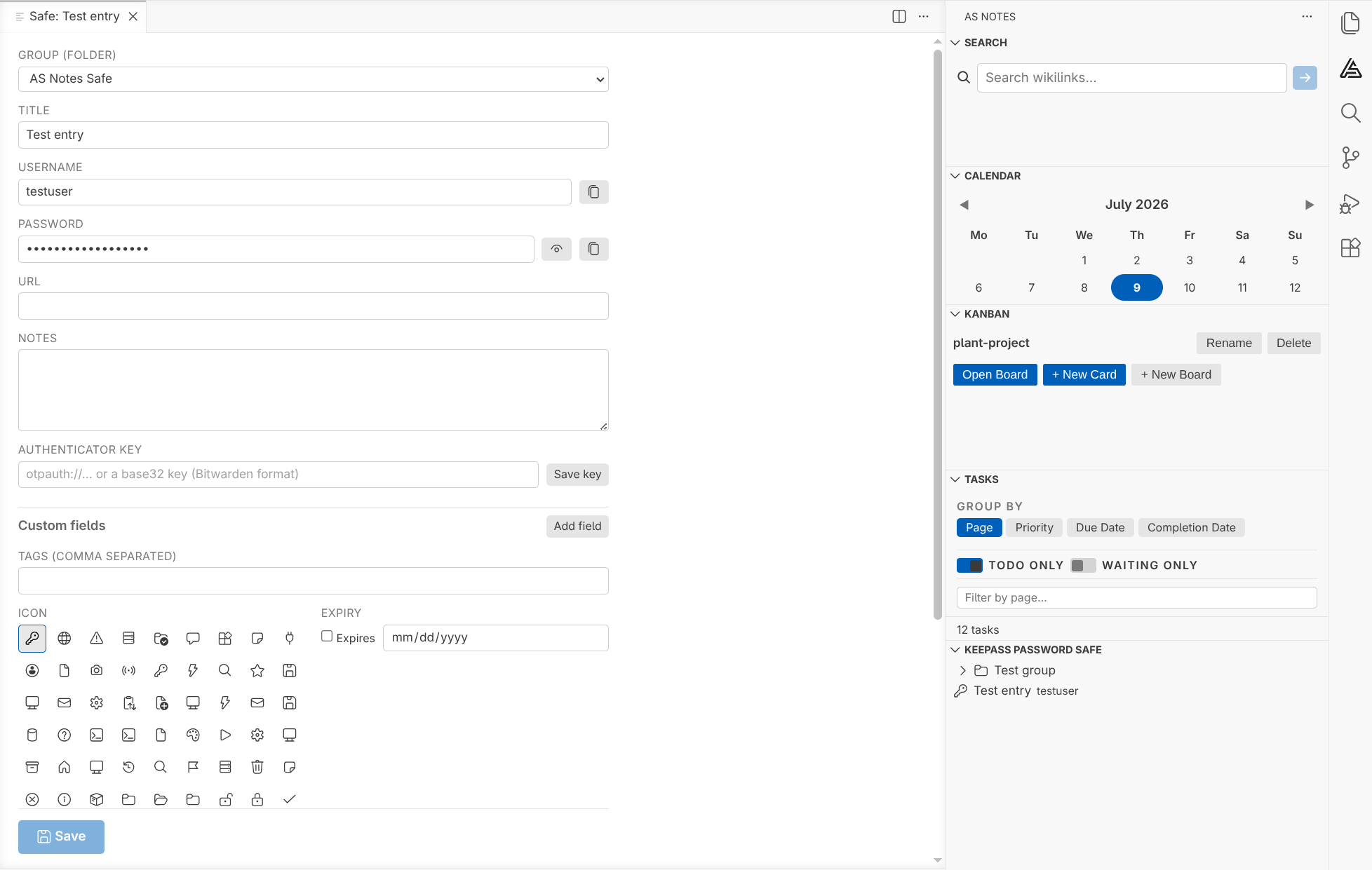
Browse and filter in the sidebar. Groups (folders), entries, live type-to-filter, and inline buttons to copy a username, password or one-time code straight to the clipboard - which then clears itself after a timeout so secrets don't linger.
Edit entries in a proper form. Standard fields, your own custom fields, tags, an icon, an expiry date, file attachments, and browsable history you can restore from. Changes are buffered and only written when you press Save, so it behaves like editing a document - and it'll warn you if you close with unsaved changes.
Authenticator keys, Bitwarden-style. Paste an otpauth:// URI or a plain base32 secret and AS Notes shows the live six-digit code beneath the field, counting down, ready to copy.
Create new safes. A short wizard walks you through a location, a master password and an optional generated key file. New safes use Argon2id with a random per-file salt - the current recommended setup.
On security - the honest version
The format and the crypto are solid: KDBX 4, Argon2id, per-file salt, authenticated encryption. The safe is only ever decrypted in the extension host (never in a web view), it auto-locks after a period of inactivity, and its master password is deliberately kept separate from the passphrase used for encrypted notes.
But a password manager comes with responsibilities that no amount of engineering removes, so a few things worth being clear about:
- AS Notes edits the
.kdbxin place. Keep a backup, especially before you open an existing safe for the first time - the first time you open a given file, AS Notes will ask you to confirm you have one. - A forgotten master password is unrecoverable. That's how KeePass works, and it's the point.
- It doesn't merge concurrent edits. If you edit the same safe on two machines at once and both sync, you'll get a file conflict to reconcile in KeePassXC. Editing on one device at a time is completely fine.
None of that is unusual for a KeePass client - it's just the honest shape of the thing.
Getting it
The password safe is a Pro feature, alongside encrypted notes. If you've got a Pro licence, update the extension and the KeePass Password Safe view will appear in the AS Notes sidebar. If you haven't, you can grab a licence from asnotes.io/pricing.
Full documentation, including the settings and the security details, is here: KeePass Password Safe.
As always, feedback is welcome - it genuinely shapes what gets built next.